Showing posts with label primary education. Show all posts

Wednesday, 25 May 2016

Puppet Pals!

Puppet pals
Name: Laura Carrillo
Level: 4th grade, groups of 4
Curriculum: English 
Topic: creating a fairy tale
Vocab related to fairy tales: princess, prince, dragon, gobblin, fairies, witch, wand, castle, village, cottage…
Previous knowledge: picture book app
Aims: 
  • To familiarise with puppet pals.
  • To be able to create an interactive story with different characters
  • To develop the oral skills: listening and speaking
  • To acquire vocabulary related to a fairy tale
  • To be able to understand a story 
  • To break down stereotypes (from the traditional stories).

Skills: speaking, listening, pronunciation
Receptive skills: Listening when the others are recording or reading the plot and reading (reading the story)
Productive skills: writing the fairy tale and speaking (recording it)
Classroom management: Groups of 4. Establish different roles.
Type of activity: Task based activity, learn by doing, ICT
Material: Ipads


I have worked with the app puppet pals. It is very interesting and useful to create a story with the kids. It is an interdisciplinary task because kids need to invent a story so they are working on language, they have to choose different characters (from the app or they can even draw their own!) so they are also working on art and when they finish the story they need to record themselves. 


It is a good oportunity to work on pronunciation, rythm, pause…etc As it is done in groups, one records the other so they become aware of their mistakes because the others can tell them what they can improve or what they have done really good.  It is a kind of group assesment during the process of it.
First kids need to structure their story: characters, placement, what happens…etc then they choose or create the characters.


Once they’ve done that, they start writing the script. The teacher revises it and corrects or suggests improvements and they can start recording. It is a very motivating activity because they are very excited with the results.
According to Bloom’s taxonomy : Higher order thinking skills. Creating their own version of the story following the characteristics of a fairy tale and then, they will have the opportunity to share the results!


Competences:

Linguistic and audio-visual, because pupils have to invent a fairy tale.

Management of information and digital interaction, in order to do the task, students have to use and interact with the app puppet pals.

Knowledge and interaction with the world, by using fairy tales we can develop the imagination of our students

Social and civic, we are going to work in groups promoting the cooperative work and stablishing roles.

Learning to learn They will have to solve problems, different opinions and become to an agreement. Thus they will have to manage their time effectively and regulate their own learning.


Assessment:
Every group will carry out their own assesment, it is a good way so that everyone becomes aware of how was their team working and also their individual contribution. Whilst the process, the teacher will move around observing each group. At the end, each group will show the rest their fairy tale and the teacher will take into account whether it follows the structure and characteristics of a fairy tale worked previously in class before using puppet pals.

The results were great and we could show to the parents how much we worked and how amazing our fairy tales were!

Hope you can use it in your classrooms! Your students will love it! ;)


Tuesday, 24 May 2016

IWB: The Solar System

Hello teachers!

In this entry Tania Grijalba, Laia López and José Luis Rodriguez are going to talk about Interactive Whiteboards in classroom, specifically about the Smart Notebook application. With Smart notebook you can easily create engaging interactive learning experiences in minutes while providing the flexibility to respond to the needs of learners on the fly. Among the large variety of applications that this resource can offer today we will focus on the Activity Toolkid. This part of the app enables to create present games and we are going to introduce one of them, the ‘multiple choice’ activity.


Target audience

The activity created is thought to be developed with second key stage (3rd - 4th grade).


Aims:

- To revise the unit we have been learning about the last sessions, the solar system.
- To create a game in a collaborative way.
- To identify the most important content and include it in the game.

Competences:

  • Linguistic and audiovisual: The students have to create the material in English and meanwhile use the English to communicate their ideas.
  • Management of information and digital: Because the students use the computer and the IWB.
  • Knowledge and interaction with the world: Due to it is a CLIL (science) session.
  • Social and civic:  In groups they have to cooperate and talk with their partners.


Classroom Management

After  having worked in previous sessions the Solar System topic, we will use a program of the IWB to review what they have learned.

The teacher will make six groups of four people and explain how to create an activity with the Smart Notebook program, in this case a multiple choice activity because we want to simulate the game Who Wants to be a Millionaire? Then children will begin to work in groups and, using notes and books about the solar system must create and think among all five questions with four answers and one of them is correct. They will have 30 minutes to create them.


Video. How to create in Smart Notebook an activity of multiple choice.
The teacher will pass from group to group reviewing that the questions are not too difficult, and especially that are not repeated with another group, very important!


When the students have finished, a person in the group will go to the computer, and with the help of the teacher will insert the five questions in the program of the IWB. When all the questions are inserted, we will make a competition by groups. 

Video. How to insert the questions on the program.       


Video. We have already prepared the questions!


Each group will go in front of the class to read their questions out loud while they are projected on the screen.  Before answering any question, each group will write down on paper what they think is the correct answer. They have 30 seconds to discuss, give an answer, and put the paper with the answer on the centre of their table.


Video. Now, we can play!


Each question will be answered on the IWB by different students, and all students in the class must answer a question. Finally, when we know which is  the correct answer, each group will show the paper with the answer that they believed were the correct ones. For each question that the group answered correctly, they will receive two points.  Besides, if the student who is answering responds well individually, will give one more point to his group.


Video. In this video is explained how to save activity on the computer. 

Assesment

The teacher will consider the process of creation of the activity by the groups, not only the final result of the competition. The teacher also will observe if all  participate actively in their groups, if they create the questions in English correctly, if they need much help or not and if they treated properly the computer.

Bloom’s Revised Taxonomy


This activity is a HOT activity because the students have to, first analyse which content is more relevant in order to create the questions and then create a game it self.

Four English skills

The creation of this game involves reading, writing, listening and  speaking. In order to create the questions first of all they have to read the unit again to revise it and decide which parts are the ones that are worth questioning. Secondly, the students have to write the questions and the answers in a paper and afterwards in the computer. Finally, the students will have to listen to each other and decide which questions and answers create for the rest of the class and also the read and speak the questions out loud.

Advantages and disadvantages

Advantages: The program is intuitive and it is really fast to create and edit the questions. You can save the game for another moment. It is motivational and helps the students to revise the content and use the language.

Disadvantages: Sometimes the program gets stuck and you can’t use it properly and it needs to be closed and opened again. The visuals are not very attractive. We wish there was more interaction between children and IWB.

I hope you will find interesting and you may use in the future.
Regards!


Tuesday, 10 May 2016

Session 4

Hi everybody!
We are Elena Joaquin and Laura Carrillo. We are going to talk about session 4 that we did with Yolanda. The session was divided in 2 parts. The first part, we have been showing our presentations about padlet and popplet,ESL Flashcards, Quizlet, Flashcard machine, study blue and mindomo. 


The first presentation was about Padlet and popplet done by Miriam, Anna and Àngels:


The following was about animal's flashcards done by Tania, Laia and Pepelu:


And the last presentation was about mindomo done by Amaranta, Ferran and Marta:

https://docs.google.com/presentation/d/1Eir67fB_vE2aCEf_Yen95d6AR7-t-lTpVwMrwDCOPvI/edit#slide=id.g101dc88313_0_86


All of them are used with computers so that it is accessible to everyone. They are all very useful as well and we, as a teacher, should use them in our lessons. Language learning is better and faster than ever before. We know much more about how students are learning -with digital technology we are unleashing the creativity of teachers and students to allow them to make progress faster. (Christopher McCormick)

The second part was more theorical where we learnt a lot about dozens of programmes that we can use.
The Hot Potatoes was one of them. It is a freeware programe (http://hotpot.uvic.ca), which we can create interactive exercises for the Web that work with any
modern web explorer (Internet Explorer, Mozilla, Firefox, etc.). There are exercises with multiple-choice options,open short-answers, jumbled-sentences,crossword exercises , matching elements or parts of sentences,ordering items and gap-fill exercises. After create them, we can post exercises on web sites, Moodles, blog or work locally. How can we post them? The first thing that you need to know is that it’s not necessary to know anything about .html language, JavaScript, etc. In case that we want them post on a blog, moddle, etc., we just have to copy the “embed code”.

In this second theorical part, Yolanda gave us information where we can create games. One of her first advice was to check out already existing games on sites such as the following web page :  http://learnenglishkids.britishcouncil.org/en/kids-games or sites, which gave you some tips and advice in the following link.http://larryferlazzo.edublogs.org/2008/04/21/the-best-websites-for-creating-online-learning-games/

We also we would like to share with you some ppt that Yolanda has done related to resources. They all are very useful and quite easy to work on. You can see it, just clicking here.


Hope it is useful!


Friday, 15 April 2016

Session 5 (14/04/2016)

written by Anna Solé Tusal and Ferran Rodríguez i Díaz


Today's session is about iPads and its different applications in Infant and Primary schools. Some of us are having our first contact with iPads, so there are a lot of new things we need to explore. The classmates who know how iPad's work will be helping the rest. Therefore, we are learning in a cooperative way. 

first contact

Now we are discussing about the pros, cons and purposes of the use of iPads in class. Some pros are that iPads are fun, interactive and nice; this device can develop and improve the ICT competence of our students. The cons we see are the lack of iPads in the school; the inappropriate use some students would do of the devices and of course one of the biggest cons are the battery issues. 
We also talked about the "What for?"; they are useful for designing interactive and motivating activities; iPads provide a wide variety of high quality visuals and are also good for a recreational use. 


We are discovering some apps we never heard before. They are apps designed to help teachers manage the class. One is called "ClassDojo", it is an easy app that will let us administrate the positive-negative points every student deserves (this can be considered behaviorist, but the app is good and motivates them a great deal). The other one is called "Classcraft"; the purpose is similar to the last app but from a different point of view. We are also talking about Book Creator, BitsBoards, Puppet Show, Tiny Tap.


Finally Miriam and me have created activities using the different apps we discovered in class. An example is BitsBoard, which is is a simple True/False game about the different spaces of our university.
This game can be listed in the Understanding and Applying steps of Bloom's Taxonomy, because it will have the students thinking and relating all the vocabulary they know. In the activity, they not only are tested in the vocabulary itself... they will have to pay attention on the spelling as well; some of the words are tricky and have been misspelled.

The target age for this activity in particular would be 9-11 years old. They not only are able to identify the different vocabulary worked in class, in addition they are able and ready to check the spelling as well.

Once again, ICT takes advantage on old/classic activities. We all know how to create vocabulary-check activities on paper... but now we are able to do them with ICT tools as the iPad. With this, you are bringing innovation and technology to the classroom. The students will enjoy more the activity and will improve their tech skills.

Here you have a couple screenshots of it:


We really encourage you to try these kind of apps; they are really useful and engaging for children!! We believe it is very important to instill in children the desire to learn in a different way, why not through ICT support?

Ferran Rodríguez and Anna Solé

Saturday, 13 June 2015

Storyjumper

Hi girls!


Today I would like to share with you a web application that we learnt with Yolanda at the beginning of the subject. This is www.storyjumper.com and it’s a web page that allows you to create illustrated books with very easy tools.


Storyjumper is a tool for developing writing stories and creativity and it also allows you to publish the stories that you have created. For creating a book we have an easy menu where there are text tools, images (props), a set of templates to create the first pages of the stories and a tab that lets you upload images from your computer.


This web application has even the option of creating a book cover and a dedication for the story so it gives you the opportunity to personalize totally your creation. 


This activity can be used for children of primary and by using this web application, children would be working more on HOTS (High order thinking skills) activities since they can create a new story and evaluate and analyze the final product.  
This kind of activities promotes children to use some skills such as reading and writing. Moreover, students could also work on other skills like speaking and listening if the stories are represented afterwards. 

Thursday, 11 June 2015

WHO WANTS TO BE A MILLONAIRE

Hello ICT girls!

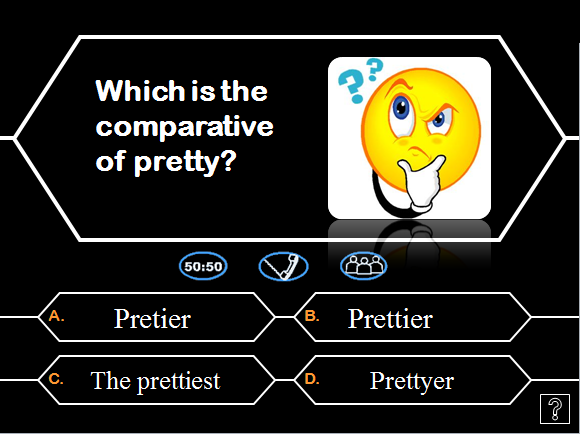
This is my last blog entry! This time I am going to present an activity I designed during my practices in the School. It consists on a Quiz from the TV program called “Who wants to be a millionaire?”


One day, my tutor from the school asked me to prepare an activity for her fifth graders students. She wanted something for practicing comparatives and superlatives and make sure they knew the rules about how to make these words from adjectives.

After thinking a lot, I decided to create a quiz because I wanted a motivating activity, different from the ones they were used to do in class. I have also chosen this tool because during the first semester of the Master, Imma Piquer introduced it to us and we really enjoyed it! It is like a gameshow; a competition that engages children a lot. 

When we played it in class they loved it! I divided children in small groups (four students in each group approximately) and each group had to decide one child to be the spokesperson and another one to write down, in a piece of paper the answer of the questions. After that, I explained them the rules of the game and we started playing.

Questions were projected on the whiteboard with its four possible answers, a, b, c or d. I read the questions and the four answers aloud and each group had to discuss and choose one of the answers. Once they had chosen the answer, the writer had to write it down in a piece of paper. After 30 seconds, I rang a bell and they had to put the pencils down and, in order, they had to say the option they had chosen. Then, I showed them the correct answer and, if it was right, I gave them a “lacasito”.


If you do a quiz with your students I recommend you to specify some rules to control the class because when doing this activity, students become more and more excited and they start speaking too loud and it can be a little chaotic. So you need a good strategy to calm them down when this situation come. Mine was the following one: If when I speak or when I ask you to be quiet, you don’t listen to me, I will take your “lacasitos” away. It worked really well.

Another recommendation to make the activity even more motivating for children is to get dressed or wear some funny complement related to quizzes, such as some glasses.


For creating this quiz I downloaded a Power Point template in this page where you can find other ones.  Of course there are other sites where you can find it and download it for free.

Related to Bloom’s Taxonomy, this activity fosters remembering, understanding and applying. It is an activity we can use for practicing or reviewing content, where children have to apply what they learnt during the previous sessions. In this case, it is a LOTS activity. However, we can turn it into a HOTS activity. After the quiz, in the same groups, students can create their own quiz, so they have to think all the questions, the possible answers and they also have to know the correct answer.

Finally, we can also use this activity as an evaluating activity. We can make it a little bit more serious and ask children to discuss and select one of the four answers and justify the decision.