Showing posts with label teachingresources. Show all posts

Thursday, 18 June 2015

Apps in Primary school

Even I couldn't assist to the last session of this subject, I have been very interested in the sessions focused on the Ipads because it is a topic that our school does not work very hard at the moment.


Having Ipads in the classroom is a wide chance of resources where learning is integrated and the process of teaching and learning becomes more effective


As I said before, I do not work with ipads at the moment in the classroom but there were some special situations during the year where students have had the opportunity to use the ipad for final projects. 


One of these situations was the second trip of our project Erasmus +. Every year, students have the opportunity to visit a partnerschool in a different country and spend a week with native English speakers sharing culture and language besides adventures and experiences. 

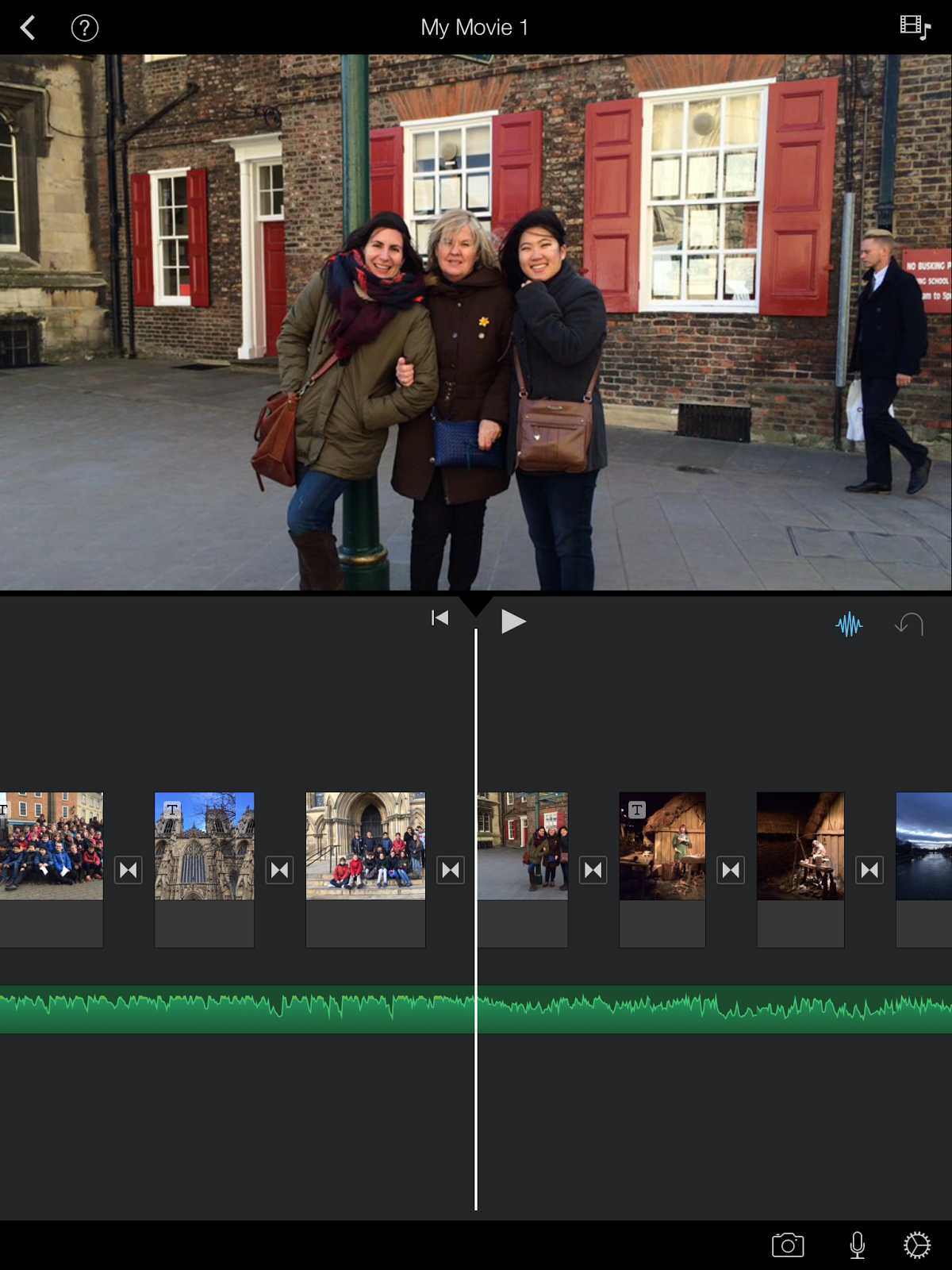
When we were back from the trip, students wanted to show to the rest of the students what they visited, what they learnt, their new friends, the place where they stayed... 


Imovie was an amazing tool because students could create their own project and share it with everybody via several platforms. 

The main idea was to choose what they wanted to share, organize it, illustrate it, design, write... and Imovie was an appropriate resource for our aims. 


Certainly, fhe fact of using Imovie was the right choice because it was easy for the students to understand how it works, to use it and to achieve the aims teachers decided.


 Watch video

Regarding to Bloom's Taxonomy, this activity is related to Higher order thinking skills (HOTS) where students have to analyse, evaluate and create a final outcome taking into consideration their own experience and their feelings. The fact to show the final product to the rest of class and to their families and friends, made the project interesting and motivating. 


On the other hand, I would like to consider iDoceo as a very useful tool for teachers. 


Instead of carrying a notebook, iDoceo makes it easy to assess pupils and have access to a register of all the notes, labels and marks. Apart, iDoceo has different options with different purposes useful for teachers as summary (look for students, personal details, diary annotations, notes, comments, resources...), gradebook (assessment), a diary, notes, a setting plan and a pinboard. 


I have been using iDoceo this year and I have seen a big change. The fact that I like the most is that children can help me during the assessment because they love iPads and they love using them.

Thursday, 14 May 2015

IWB experience

I’ve never used an IWB before until last week in our ICT session. I don’t have an IWB at home and I haven’t started working as a teacher yet so I didn’t had the opportunity to work with this technology.
After the first contact with an IWB I can say that I really liked the experience because it was not difficult to use it and because I think that it is a very useful tool that offers some advantages when teaching and affects learning in several ways.

First of all, digital boards can promote and increase students’ motivation and enthusiasm for learning and, consequently, raise the level of students’ engagement in classroom and prevent passive learning. Sessions become dynamic and participative and children have an active role, so I imagine that they enjoy it.  

Secondly, IWBs provides visual support that complements teachers’ explanations and help children to understand better the content of the lesson.

IWBs also provide a wide variety of dynamic activities to be done in the classroom. As teachers, we can create many types of activities for our kids and children can draw; write, put images, copy and paste things as many times they want, be creative, add audio files and audio recordings do the exercises the teacher prepares and create their own ones.

Finally, apart from teaching specific content related to a subject or topic, we also educate children to become ICT knowledgeable students.

In the last session I was being working on two different Smart Board activities related to Bloom’s Taxonomy.
The first activity is based on remembering so it is for working on Lower Order Thinking Skills. It is an activity for first grade of primary. It consists on matching the words with the correct images so, after having previously introduced clothes vocabulary, children have to relate words and pictures to practice and remember the vocabulary presented.


The second one focusses on creation so promotes higher order thinking skills. This activity is for second or third grade of primary (depending on their level of English) and the topic is “wild animals”. We’ll do it after dealing with wild animals. It is called I spy with my little eye something… and under the title they have a square and a speaking bubble. Inside the square they have to “draw” a wild animal, the one they want (they have to look for an image of this animal and past it inside the square). Then, they have to write a short description of this animal inside the speaking bubble (see in the example) and finally, they also have read out loud and record the description and add it inside the bubble. Once they have created the activity, they will group in peers or in threes and they will play the game. So one child will start reading and listening the description of his classmate and he will try to guess which animal it is. When he thinks that he knows the animal, he will click inside the square and the image will appear so he will be able to check if he was right or not. If he doesn’t know the animal, he can ask his classmate for some more clues. Then, the other child will do the same. The image is an example of the final product. Children have to design all the activity (write the title, draw the square and the speaking bubble, search the image of the animal, past it inside the square and add animation, write the description inside the bubble and record the description.)


here is the link to get to the file


Wednesday, 13 May 2015

IWB - Interactive whiteboards


Currently most of the classes in the schools have Interactive whiteboards and it is actually a very good tool to use in the teaching-learning process.
The proper use of this tool helps to develop more dynamic and showy lessons and it helps to increase children’s participation. Moreover it can be used with students of all ages and in all the different subjects.

Regarding to my experience I used IWB several times in different schools but my experience was rather poor because I used it as a computer. Therefore I did not use it at all as an interactive tool.


I created two different activities to be used with IWB. The first one is developed with the Lesson Activity Toolkit 2.0 and it is a memory related to the Trafalgar Square from London.  


It is a LOTS (Lower Order Thinking Skills) activity and it is based on remembering and understanding.


The second one is more complex and it is a HOTS (Higher Order Thinking Skills) activity. It is a creating and analyzing activity and it consists in creating a new Trafalgar Square. There are different images of objects and parts of the real Trafalgar Square and children can make up a new Trafalgar Square putting the images in the white spaces.  


The different pictures are locked and children can move them but not modify them. The pictures have also a recording and every time a person touches the picture there is a sound of the name of the object touched.      

Both activities are created for P5 and it is important to make a previous knowledge and to work on the different vocabulary.  

Tuesday, 12 May 2015

IWB nowadays

Working with IWB


Nowadays, digital boards cover different aspects in Primary School. Digital boards integrate technology in the classroom, sessions become dynamic and cognitive development increases.

I have been using digital boards for several years almost every day and I can say that children really enjoy it. It is a very useful tool in the class because it provides visual support, music, a timer, Internet, examples… an endless number of resources integrated in one.  However, what I like the most about digital boards is that students have hands on experience so it is not only a tool for the teacher but for the students too.

I have been working on two different Smart Board activities related to Bloom’s taxonomy. One of the activities is based on remembering and understanding skills and the other one focusses on creation, analysis and self-evaluation.

Both of them are adapted to a Primary 1 class. The first one consists in choosing the correct option for the different images that keep appearing on the screen. Having previously introduced vocabulary, students will choose which one is the correct one. This activity includes visual support and self-assessment.


The second one consists in a short and guided presentation of students’ favourite pet. They have the chance to add a photo with their favourite pet and talk about them with a recording. There is a template for all of them and, depending on individual abilities, they will be able to insert  a photo by themselves and to record a short description based on their previous knowledge